DRAGINO LHT65
The Dragino Temperature and & Humidity (LHT65) module is an environment module that comes with a built-in SHT20 Temperature & Humidity sensor and has a external sensor that allows external sensors to be connected, such as an illumination sensor. This device works both as a data logger, recording up to 3200 environment measurements and also as a wireless sensor for network applications. The battery of this device is a 2400mAh non chargeable battery that is ratted for up to 10 years of utilization under optimal conditions (LoS communications and sparse uplink rates).
Built-in temperature sensor information:
Accuracy tolerance : Typ ± 0.3 ◦C
Long term drift: < 0.02 ◦ C/yr
Operating range: -40 ∼ 125 ◦C
Built-in humidity sensor information:
Resolution: 0.04 % RH
Accuracy tolerance: Typ ± 3 % PH
Long term drift: < 0.02 ◦C/yr
Operating range: 0 ∼ 96 % PH
External illumination sensor information:
Resolution: 1 lx
Range: 0-65535 lx
Operating range: -40 ◦C ∼ 85 ◦C With this device setup, the power consumption of the device is 4uA in idle mode and 130mA when transmitting at maximum power
Set Up
To config the lht65 it is necessary a TTL to USB converter which much be set up according to images following:
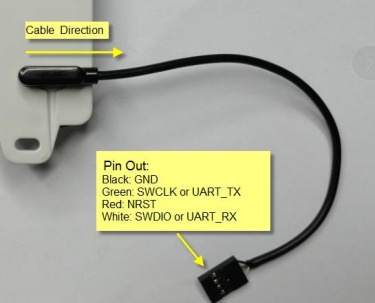
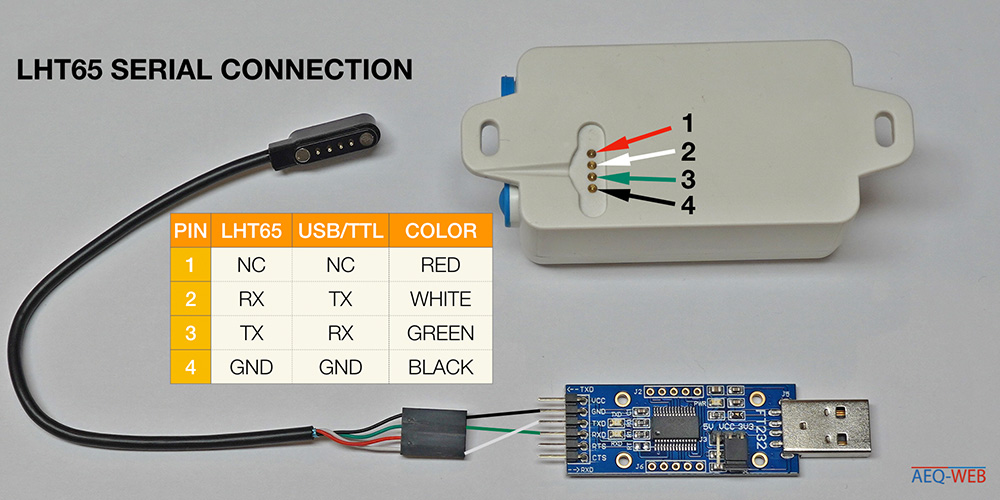
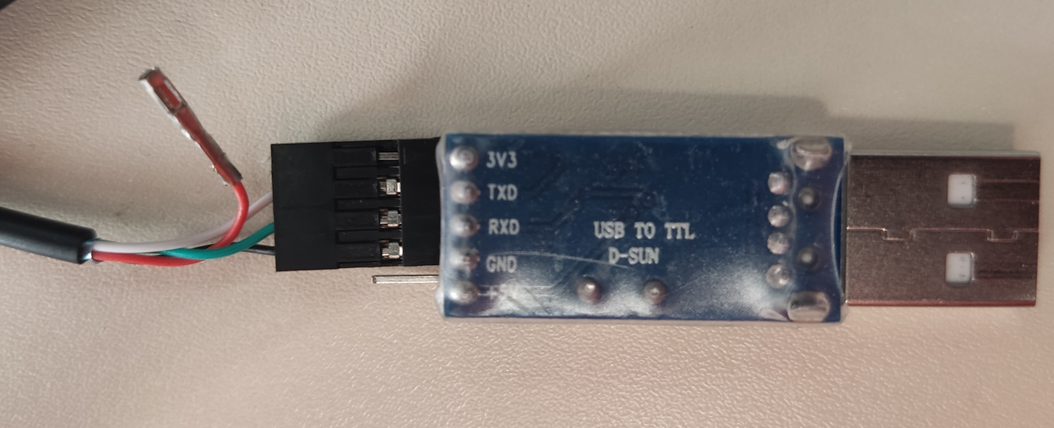
After this its necessary to find to which USB port the device is connected which can be done using the following commnad:
$ dmesg | grep tty

TTL/USB converter name is pl2303, therefore the device is connected to COM ttyUSB0 (last line).
To be sure, before connecting to the device, you must have permission to access the port.
# sudo chmod 666 /dev/<COMNAME>
$ sudo chmod 666 /dev/ttyUSB0
Connecting to the device can be done using putty, cu(https://www.cyberciti.biz/faq/find-out-linux-serial-ports-with-setserial/) or comtools (https://github.com/Neutree/COMTool).
After that, the LHT65 can be accessed by any of the previous serial tools. The example bellows uses ComTool
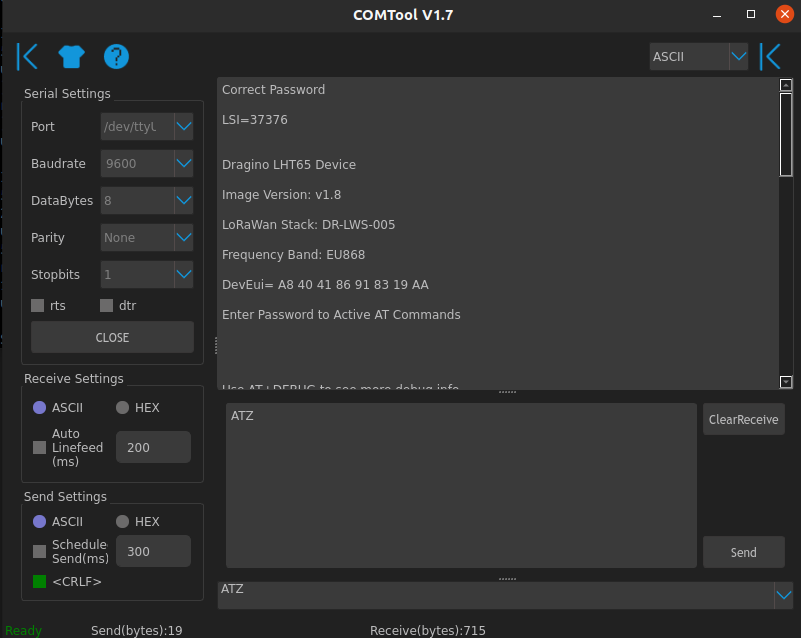
To change the device values, first insert the password and a paragraph (mandatory).
Examples of commands:
Function |
Command |
|---|---|
Deactivate ADR |
AT+ADR=0 |
Change DR |
AT+DR=”number between 0 and 7” |
Change Transmissing time |
AT+TDC=”number in miliseconds” |
Get TXP from device |
AT+TXP=? |
Change the EXT device |
AT+EXT=5 |
Decoder Code
The decoder code for Chirpstack.
function Decode(fPort, bytes){
var data = {
      //External sensor
      Ext_sensor:
      {
        "0":"No external sensor",
        "1":"Temperature Sensor",
        "4":"Interrupt Sensor send",
        "5":"Illumination Sensor",
        "6":"ADC Sensor",
        "7":"Interrupt Sensor count",
      }[bytes[6]&0x7F],

      //Battery,units:V
      BatV:((bytes[0]<<8 | bytes[1]) & 0x3FFF)/1000,

      //SHT20,temperature,units:
      // TempC_SHT:((bytes[2]<<24>>16 | bytes[3])/100).toFixed(2),
      // DARIO - Original (above) changed to return number instead of str
      TempC_SHT:((bytes[2]<<24>>16 | bytes[3])/100),

      //SHT20,Humidity,units:%
      //Hum_SHT:((bytes[4]<<8 | bytes[5])/10).toFixed(1),
      // DARIO - original (above) changed to return number instead of str
      Hum_SHT:((bytes[4]<<8 | bytes[5])/10),

      //DS18B20,temperature,units:
      TempC_DS:
      {
        "1":((bytes[7]<<24>>16 | bytes[8])/100).toFixed(2),
      }[bytes[6]&0xFF],

      //Exti pin level,PA4
      Exti_pin_level:
      {
        "4":bytes[7] ? "High":"Low",
      }[bytes[6]&0x7F],

      //Exit pin status,PA4
      Exti_status:
      {
        "4":bytes[8] ? "True":"False",
      }[bytes[6]&0x7F],

      //BH1750,illumination,units:lux
      ILL_lux:
      {
        "5":bytes[7]<<8 | bytes[8],
      }[bytes[6]&0x7F],

      //ADC,PA4,units:V
      ADC_V:
      {
        "6":(bytes[7]<<8 | bytes[8])/1000,
      }[bytes[6]&0x7F],

      //Exti count,PA4,units:times
      Exit_count:
      {
        "7":bytes[7]<<8 | bytes[8],
      }[bytes[6]&0x7F],

      //Applicable to working mode 4567,and working mode 467 requires short circuit PA9 and PA10
      No_connect:
      {
        "1":"Sensor no connection",
      }[(bytes[6]&0x80)>>7],
  };
  return data;
}
You can calculate the estimated batery time using this spreadsheet
More information can be found here.